Custom AI alerts
Describe what to watch for. Get an alert when it happens.
Tell the vision language model what matters on each camera, in plain words or from ready-made lists, and get an alert with the frame the moment it appears.
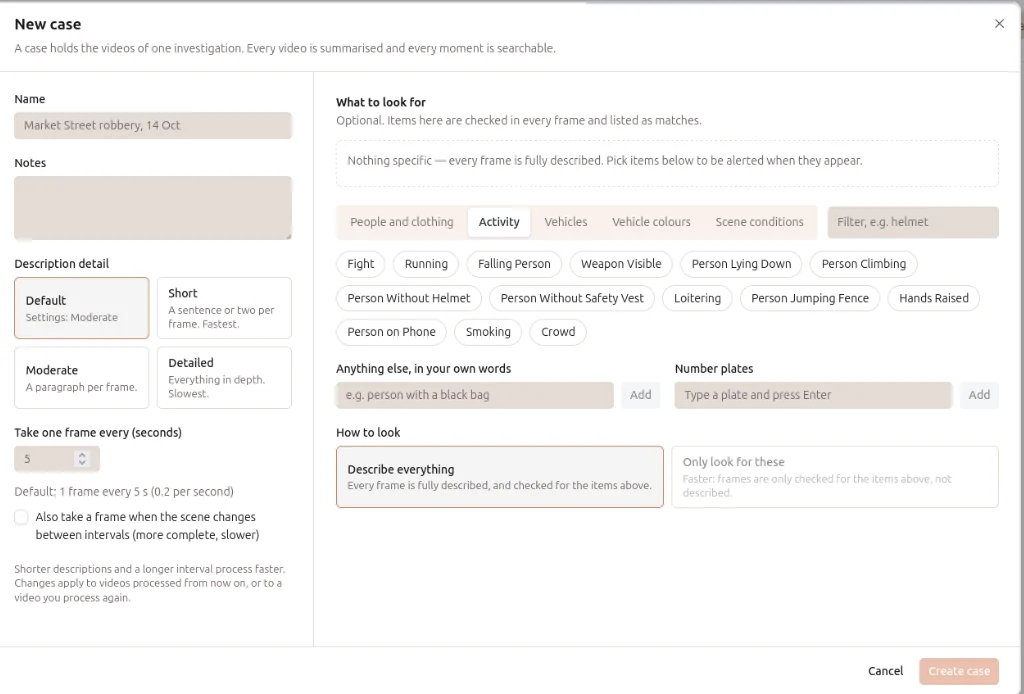
What it does.
Classic analytics only catch what they were built for. Custom AI alerts let you describe the moment you care about instead: a person climbing the gate, a van at the loading bay after hours, someone without a helmet on the shop floor. The model checks every frame it reads against your list and raises an alert with the frame, the camera and the time.
- Describe it in words
- Write what to look for in plain language. No model training and no rule builder.
- Ready-made lists
- Pick from people and clothing, activity, vehicles, vehicle colours and scene conditions.
- Only look for these
- Keep a camera focused on your list, or choose Describe everything to capture every frame for later search.
- Per camera, per case
- Give each camera or investigation its own list of things to watch.
- Alerts with evidence
- Every alert carries the frame, its description, the camera and the time.
- Searchable afterwards
- Alerts and descriptions feed AI video search, so you can ask about them later.
How it works.
- 01
Ingest
Live RTSP cameras or recorded footage, from the cameras you already have.
- 02
Detect
Every frame is analysed for the people, vehicles and objects this product looks for.
- 03
Match
Detections are compared with your watchlists, rules and zones.
- 04
Alert
Matches reach your team with the frame, the camera and the time.
On-premises or cloudInstalled on your systems, in the cloud, or both.
REST APIsIntegrate with your video analytics application and third-party software.
Your camerasWe size the hardware and recommend cameras. The cameras stay yours.