AI video search
Ask your footage a question.
An AI search assistant answers plain-language questions about your video, and keyword search finds any specific thing across every camera.
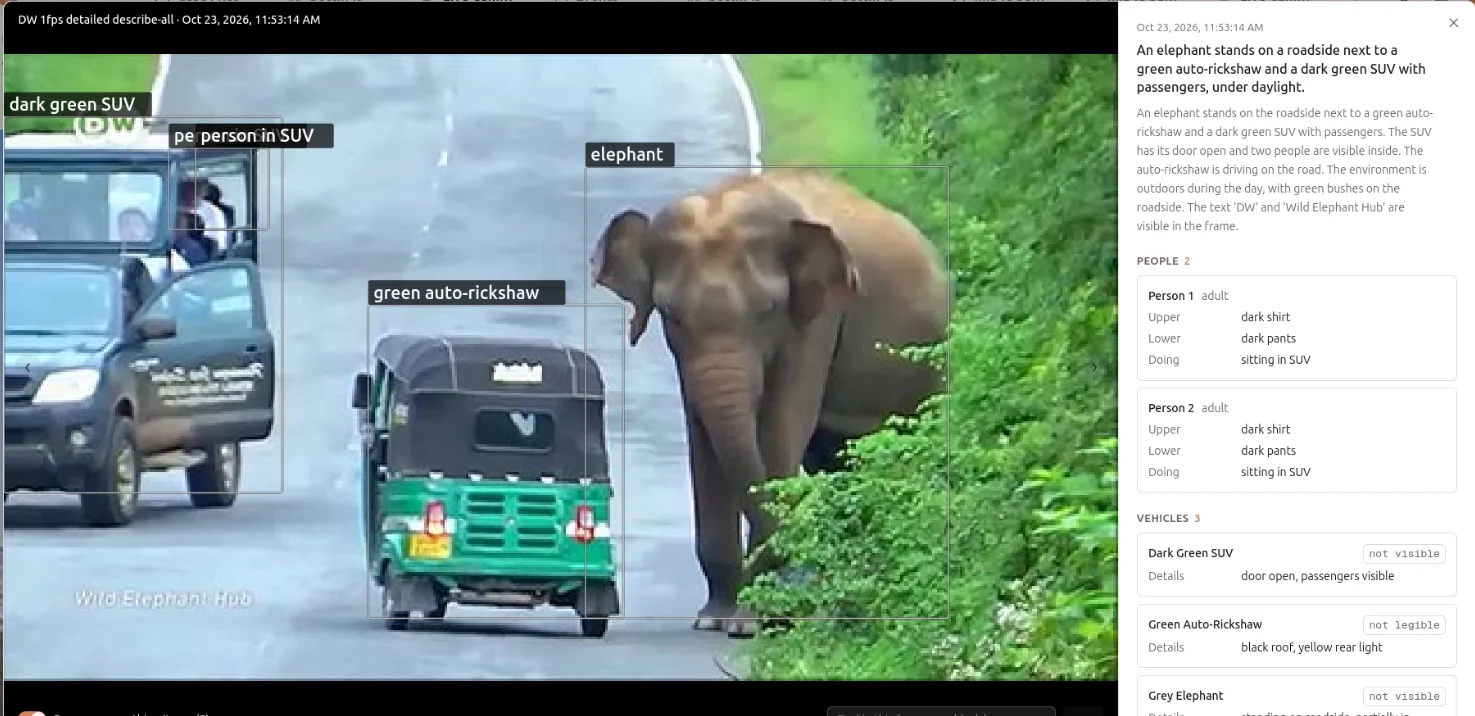
What it does.
Every frame summary is stored as a vector embedding. When you ask "when did someone leave a bag near gate 3?", the assistant retrieves the matching moments (RAG) and answers with timestamps that link straight to the frames. When you know exactly what you want, keyword search finds every frame whose description contains it.
- AI search assistant
- Ask in plain language. Answers come with timestamps and cameras, linked to the frames they're based on.
- Keyword search
- Find any specific thing, such as "black bag", "red shirt" or a plate number, across every description.
- Filters
- Narrow by case, camera, date range and watch-list hits.
- Find in this frame
- Search inside a single frame to box exactly what you asked for.
How it works.
- 01
Ingest
Live RTSP cameras or recorded footage, from the cameras you already have.
- 02
Detect
Every frame is analysed for the people, vehicles and objects this product looks for.
- 03
Match
Detections are compared with your watchlists, rules and zones.
- 04
Alert
Matches reach your team with the frame, the camera and the time.
On-premises or cloudInstalled on your systems, in the cloud, or both.
REST APIsIntegrate with your video analytics application and third-party software.
Your camerasWe size the hardware and recommend cameras. The cameras stay yours.